Tap Unlock1.0.0
Publisher Description

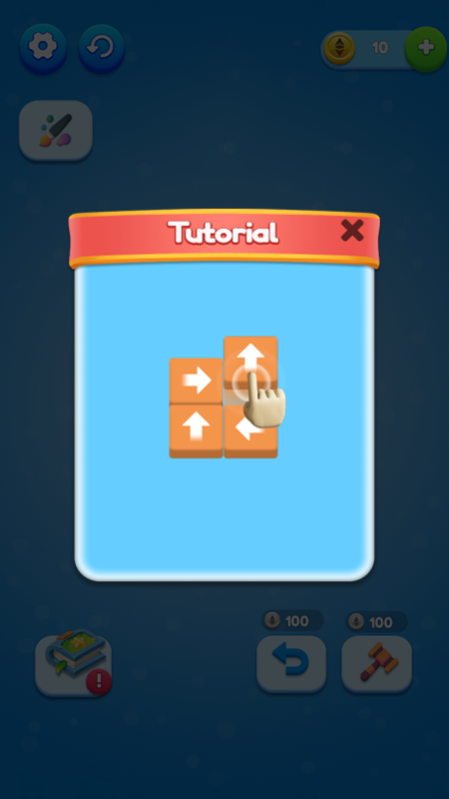


Tap Unlock Game is an addictive puzzle game that will help you to improve your strategic skills and brain power.
Test your Skills! Tap on Block one by one and remove all of them.
1000+ levels!
All the levels are unique with different hardness.
How to play?
Tap on block/box with arrow directions to release and make sure that it will be removed from the screen.
If all the blocks removed successfully you will get a reward and the next challenge begins.
If none of the boxes are able to move, level will be over and try out one more time!
You can use Hammer and Hint while getting stuck.
Features
Easy to play, hard to master.
Unique levels.
Get reward after level completion.
Suitable for tablet and mobile.
Realistic high-quality graphics and ambient sound.
Realistic stunning and amazing animations.
Smooth and simple controls.
User friendly interface and interactive graphics.
Download the game to improve your brain power and develop new logical skills.
Have fun!!!
About Tap Unlock
The company that develops Tap Unlock is 深圳市子非鱼网络科技有限公司. The latest version released by its developer is 1.0.0.
To install Tap Unlock on your Huawei device, just click the green Continue To App button above to start the installation process. The app is listed on our website since 2023-01-10 and was downloaded 1 times. We have already checked if the download link is safe, however for your own protection we recommend that you scan the downloaded app with your antivirus. Your antivirus may detect the Tap Unlock as malware as malware if the download link to C107575627 is broken.
How to install Tap Unlock on your Huawei device:
- Click on the Continue To App button on our website. This will redirect you to Huawei Store.
- Once the Tap Unlock is shown in the Huawei Store listing of your Huawei device, you can start its download and installation. Tap on the Install button located below the search bar and to the right of the app icon.
- A pop-up window with the permissions required by Tap Unlock will be shown. Click on Accept to continue the process.
- Tap Unlock will be downloaded onto your device, displaying a progress. Once the download completes, the installation will start and you'll get a notification after the installation is finished.
